
Embedded Systems Products for Development, Testing & Validation
Practical engineering tools for ECU development, configuration, testing and validation.
Building dependable embedded software requires more than writing code. Engineers need the right tools to configure software components, communicate with hardware, investigate system behavior and validate functionality throughout development.
At PiEST Systems, we develop Engineering Systems Products shaped around the technical challenges of embedded and automotive engineering. Our product portfolio brings together Automotive ECU Testing Software, an AUTOSAR Configuration Tool, Embedded Systems Development Tools and Automotive Testing Tools that help engineers organize complex development and verification activities.
Whether you’re developing an ECU, configuring AUTOSAR software, examining vehicle network communication or preparing a validation environment, explore our Engineering Software Products to find a solution suited to your workflow.
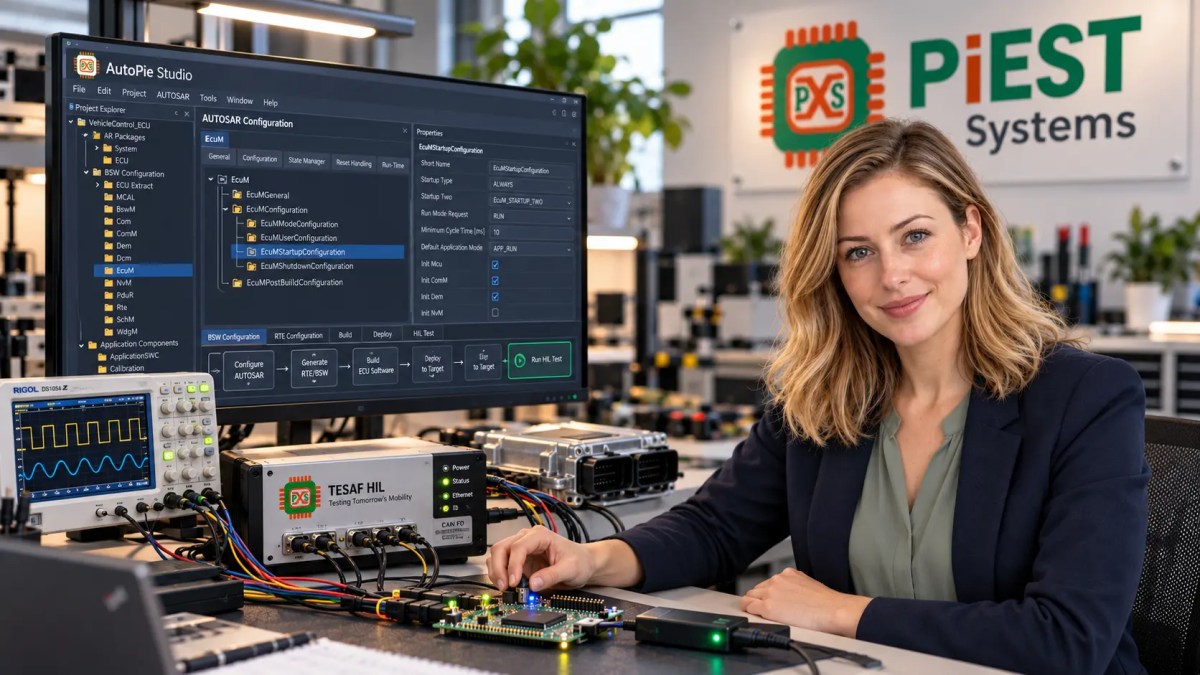
Explore Our Embedded Systems Products
Our engineering software portfolio currently features TESAF and AutoPie Studio. Each addresses a different part of the ECU engineering lifecycle.
TESAF – Automotive ECU Testing Software
Analyze communication. Execute tests. Investigate ECU behavior.
TESAF is an Embedded Systems Products developed by PiEST Systems for automotive ECU communication, diagnostics, test execution and validation workflows.
As Automotive ECU Testing Software, TESAF is designed for engineers who need to interact with ECUs, observe network traffic, configure test scenarios and investigate responses during development and validation.
The platform brings several engineering activities into a common workspace, reducing the need to manage unrelated testing utilities for individual tasks.
Key capability areas
- Vehicle network communication: Work with supported communication channels and inspect transmitted and received messages.
- ECU diagnostics: Carry out supported diagnostic communication and examine ECU responses during testing.
- Test execution: Organize manual and automated test activities around defined validation objectives.
- Simulation and emulation: Configure supported test environments to exercise ECU behavior and communication scenarios.
- Measurement and analysis: Observe messages, signals and diagnostic results when investigating system behavior.
- Calibration and flashing: Explore the applicable measurement, calibration and firmware programming workflows supported by the selected configuration.
TESAF is relevant to developers, integration engineers, validation teams and organizations evaluating Automotive Testing Tools for ECU development and verification.
Typical engineering applications
CAN and CAN FD communication testing, diagnostic validation, ECU integration, protocol analysis, automated test execution and HIL-oriented engineering workflows.
Feature availability depends on product edition, supported hardware and current software release.
Tools built for real engineering workflows.
Explore our software for ECU testing, diagnostics and embedded development. Choose a product to review its capabilities or contact our team to discuss a demonstration.
TESAF
Automotive ECU Testing & Validation Software
Inspect communication, investigate ECU responses and organize manual or automated validation activities in one engineering workspace. Explore TESAF’s protocol, diagnostics and test features to see whether they fit your environment.
Need a demo for a particular ECU or hardware interface? Share your use case with our team.
| BUS | TIME | ID | DATA |
|---|---|---|---|
| CAN1 | 0.000 | 0x7DF | 02 01 0C 00 |
| CAN1 | 0.012 | 0x7E8 | 04 41 0C 1A F8 |
| UDS | 0.026 | 0x7E0 | 03 22 F1 90 |
| UDS | 0.044 | 0x7E8 | 10 14 62 F1 90 |
| CAN1 | 0.058 | 0x18DAF110 | 30 00 00 00 |
Illustrative interface mockup — replace with an approved TESAF screenshot.
Explore TESAF Features
Review the principal engineering workflows and open the full product page for more detailed information.
Network communication
Inspect supported bus traffic and communication behavior during ECU development.
Diagnostics & analysis
Investigate diagnostic responses and examine message data in a structured workspace.
Test workflows
Organize manual and supported automated testing around your validation requirements.
Capability availability depends on release, licensing and compatible hardware.
AutoPie Studio – AUTOSAR Configuration Tool
Organize AUTOSAR development with a dedicated engineering workspace.
AutoPie Studio is PiEST Systems’ AUTOSAR-oriented engineering application for configuring and managing ECU software development activities.
Designed as an AUTOSAR Configuration Tool, AutoPie Studio provides a structured environment for navigating AUTOSAR project information, working with configuration parameters and handling engineering artifacts used during ECU software development.
It is intended for embedded software developers, AUTOSAR engineers, software integrators and engineering teams working with complex ECU architectures.
Key capability areas
- AUTOSAR project organization: Navigate imported project information and examine configuration elements in a structured workspace.
- Software component engineering: Work with application software component definitions, interfaces, ports and runnables.
- BSW configuration: Organize configuration parameters and dependencies within the supported basic software environment.
- ARXML workflows: Inspect and manage supported AUTOSAR XML engineering artifacts.
- Configuration validation: Identify relevant configuration issues through available consistency-checking functions.
- Development workflow management: Bring supported configuration and integration activities into a common engineering environment.
AutoPie Studio complements other Embedded Systems Development Tools by focusing on AUTOSAR architecture, configuration and software integration workflows.
The product is being introduced through an early-access process. Available capabilities, supported AUTOSAR releases and integration options should be confirmed for the version under evaluation.
Design the configuration. Understand the system.
Meet AutoPie Studio, an AUTOSAR engineering workspace for organizing ECU configuration, reviewing software components and working with supported ARXML projects.
AutoPie Studio
AUTOSAR Configuration & ECU Software Engineering
Move through AUTOSAR project information in a structured workspace. Explore BSW configuration, software component definitions, ARXML organization and configuration validation capabilities as AutoPie Studio evolves.
Request Early Access opens the official product page, where you can find the current early-access enquiry option.
Configuration Explorer
- ▾ ECU_Project
- ▾ BSW Modules
- ⚙ CAN
- ↳ CanIf
- ↳ PduR
- ↳ Dcm
- ▸ SW Components
- ▸ ARXML Files
Properties / CanController
| Module | Can |
| Controller ID | 0 |
| Baud rate | 500 kbit/s |
| Activation | Enabled |
| Processing mode | Interrupt |
| Validation | No sample issues |
Illustrative interface mockup — replace with an approved AutoPie Studio screenshot.
Explore AutoPie Studio Features
See how AutoPie Studio is designed to bring related AUTOSAR engineering tasks into a consistent environment.
BSW configuration
Navigate supported basic software modules and review ECU configuration parameters.
ARXML workflows
Inspect structured AUTOSAR project information and relevant configuration artifacts.
SWC engineering
Work with application software component concepts, interfaces and runnable definitions.
Early-access functionality and support vary by release. Confirm compatibility and availability with PiEST Systems.
Why PiEST Systems Develops Embedded Systems Products
Engineering teams often face a common challenge: the work is complex, but the supporting workflow is fragmented.
A developer may need one application to examine AUTOSAR configuration, another to work with communication data and a different environment to test an ECU. Moving between these activities can make troubleshooting and project organization more difficult.
At PiEST Systems, our approach to Engineering Software Products begins with understanding the engineering task itself.
Built Around Engineering Workflows
Our product direction is informed by embedded software development, communication protocols, ECU integration and testing activities rather than general-purpose office software requirements.
Technical Clarity
Engineering information should be straightforward to locate and interpret. Whether an engineer is examining configuration data or analyzing communication, the interface should support focused technical work.
Practical Development Context
Our Engineering Software Products are intended to address activities engineers encounter during ECU software development, integration and verification.
A Connected Engineering Perspective
Our work across software development, testing and technical training gives us a broader perspective on how Embedded Systems Development Tools should support both development and validation activities.
Embedded Systems Development Tools for the ECU Engineering Lifecycle
An ECU project involves a sequence of related activities. Requirements lead to architecture decisions, software configuration, integration, testing and validation.
The right engineering tools can support individual stages without forcing every activity into the same application.
Software Architecture and Configuration
AutoPie Studio focuses on managing AUTOSAR-oriented project structures, configuration information and supported software integration activities.
ECU Communication and Diagnostics
TESAF provides a platform for investigating supported ECU communication and diagnostic behavior during engineering work.
Integration and Validation
Engineering teams can use appropriate Automotive ECU Testing Software to examine communication responses, conduct repeatable tests and investigate the behavior of connected hardware.
Test Analysis and Investigation
Supported Automotive Testing Tools help engineers observe communication activity, study responses and collect information required for validation and troubleshooting.
Our Engineering Software Products are developed to support these related activities through dedicated applications, rather than claiming that every tool performs every task.
Engineering Applications Across Different Industries
Our software development work is rooted in embedded engineering, with automotive applications forming an important part of the current product portfolio.
Automotive Electronics
ECU communication, embedded software configuration, diagnostics and system-level validation are central applications for TESAF and AutoPie Studio.
Electric Vehicles and Electronic Control Systems
Embedded electronic controllers require reliable communication, firmware configuration and systematic verification. Relevant product capabilities can be evaluated against the requirements of a specific EV or electronic control project.
Industrial Embedded Systems
Industrial electronic systems also rely on embedded processors, communication interfaces and structured verification. Teams can discuss whether our current Automotive Testing Tools and engineering applications are suitable for their non-automotive hardware and protocols.
Aerospace, Avionics and Medical Electronics
These industries often require rigorous configuration management, verification and traceability. PiEST Systems can discuss engineering requirements in these domains, but suitability for regulated or safety-critical applications must be evaluated separately. No product certification or domain qualification is implied.
Choose the Right PiEST Systems Embedded Systems Products
Not every engineering project needs the same software.
Choose TESAF when your primary work involves:
- ECU communication and network investigation.
- Automotive diagnostics and protocol testing.
- Manual or automated validation activities.
- Examining messages and test results.
- Evaluating tools for supported HIL and bench-testing workflows.
TESAF is the starting point when your requirement is Automotive ECU Testing Software.
Choose AutoPie Studio when your primary work involves:
- AUTOSAR software architecture and configuration.
- Managing supported BSW configuration data.
- Working with AUTOSAR software components.
- Reviewing or managing ARXML engineering artifacts.
- Organizing AUTOSAR development and integration activities.
AutoPie Studio is the starting point when your requirement is an AUTOSAR Configuration Tool.
If your organization works on both ECU software development and validation, the two products can be considered for their respective roles. Integration between them should not be assumed without confirming the applicable product versions and interfaces.
Embedded Systems Products Backed by Technical Understanding
At PiEST Systems, software tools are one part of a wider engineering focus that includes embedded systems development, automotive technologies, technical research and practical training.
This background shapes how we think about Engineering Software Products: engineers need workflows that reflect real software structures, hardware interfaces, configuration dependencies and test objectives.
Our Embedded Systems Development Tools portfolio is intended to evolve around those needs, with product information, supported features and technical documentation helping users decide which solution is appropriate.
For engineering teams considering a product evaluation, we encourage discussions based on the intended application, target hardware, protocol requirements and desired development or testing workflow.
Product Demonstrations and Engineering Enquiries
Selecting engineering software is a technical decision. A tool must fit the project, the team and the environment in which it will be used.
Before choosing a product, you may want to understand its supported operating systems, hardware interfaces, licensing model, integration requirements, test capabilities and current release status.
PiEST Systems welcomes enquiries from ECU developers, embedded engineering teams, automotive testing professionals, research groups and organizations looking for engineering software.
What you can discuss with us:
- TESAF product demonstrations and available editions.
- AutoPie Studio early-access enquiries.
- Supported engineering workflows and technical requirements.
- Hardware and protocol compatibility.
- Licensing and commercial information.
- Related embedded engineering services and training.
Frequently Asked Questions About PiEST Systems Products
What Engineering Software Products does PiEST Systems offer?
PiEST Systems currently features TESAF and AutoPie Studio. TESAF focuses on ECU communication, diagnostics and testing, while AutoPie Studio focuses on AUTOSAR-oriented software configuration and development workflows. Each product serves a distinct engineering purpose.
What is TESAF Automotive ECU Testing Software used for?
TESAF is designed for engineers working with ECU communication, supported vehicle networks, diagnostics and test execution. It can help organize relevant validation activities and provide access to communication information needed during engineering investigations.
Is AutoPie Studio an AUTOSAR Configuration Tool?
Yes. AutoPie Studio is designed as an AUTOSAR Configuration Tool for managing supported AUTOSAR software configuration and related ECU development information. Its currently available functions and supported project environments should be confirmed before adoption.
What types of Embedded Systems Development Tools are available from PiEST Systems?
PiEST Systems currently focuses on TESAF for testing and AutoPie Studio for AUTOSAR engineering. The two applications serve different parts of the embedded development lifecycle. Additional product offerings will be published when they become available.
Are PiEST Systems Automotive Testing Tools suitable for HIL testing?
TESAF is designed to address HIL-related testing workflows, subject to the supported edition, interfaces and hardware environment. Engineers should confirm current HIL functionality and hardware compatibility for their specific test setup.
Can I request a demonstration before choosing a product?
Yes. You can contact PiEST Systems to enquire about TESAF demonstrations or AutoPie Studio early access. The team can discuss available evaluation options and your intended engineering requirements.
Do TESAF and AutoPie Studio replace every other engineering tool?
No. Each application has a defined engineering focus. Hardware interfaces, compilers, debuggers, software stacks, existing toolchains or other specialist utilities may still be necessary depending on the project.
Explore Embedded Systems Products from PiEST Systems
Whether you need to examine ECU communication, organize AUTOSAR configurations or evaluate software for an embedded engineering project, choosing the appropriate tool starts with understanding your technical requirements.
Explore TESAF and AutoPie Studio to see how PiEST Systems approaches engineering software development, or contact our team to discuss your application.
PiEST Systems – Engineering software shaped by practical development and testing needs.
